This is not a review on the X100V, just a few thoughts.
I do love the feel of the camera, and how engaging it is to shoot with.
Why the X100V works for street
Its a wonderful camera for street photography with its 35mm equivalent lens, great sensor and responsive focus. It produces beautiful Jpgs that don’t require any editing to use, and you can shoot RAW to give other processing options as well.
What sets it apart from “just another fixed-lens compact”:
- The hybrid optical/electronic viewfinder lets you switch between a clean rangefinder view (great for seeing a subject walk into frame before they’re there) and a full live preview with the film simulation applied.
- The leaf shutter is silent — useful when you’re 2 metres from someone and don’t want them to notice the click.
- The V is weather-sealed (with the optional adapter ring + filter), which matters if you shoot in Jakarta during rainy season.
- 26MP is plenty for prints, and the film simulations — especially Classic Negative and Acros — give you JPGs you’d be happy to publish straight off the card.
There are a number of other cameras that share these attributes though. One of the understated attributes of the X100V is that it can automatically pair with a Fuji Instax printer allowing you to print your photos immediately on the street.
Which Instax printers it pairs with: the X100V talks Bluetooth to the Instax Mini Link, Square Link, Wide Link, and the older Share SP-2 / SP-3. You set it up once in the Fujifilm camera app, and after that the camera itself can send the photo straight to the printer — no phone in the middle.
The street magic

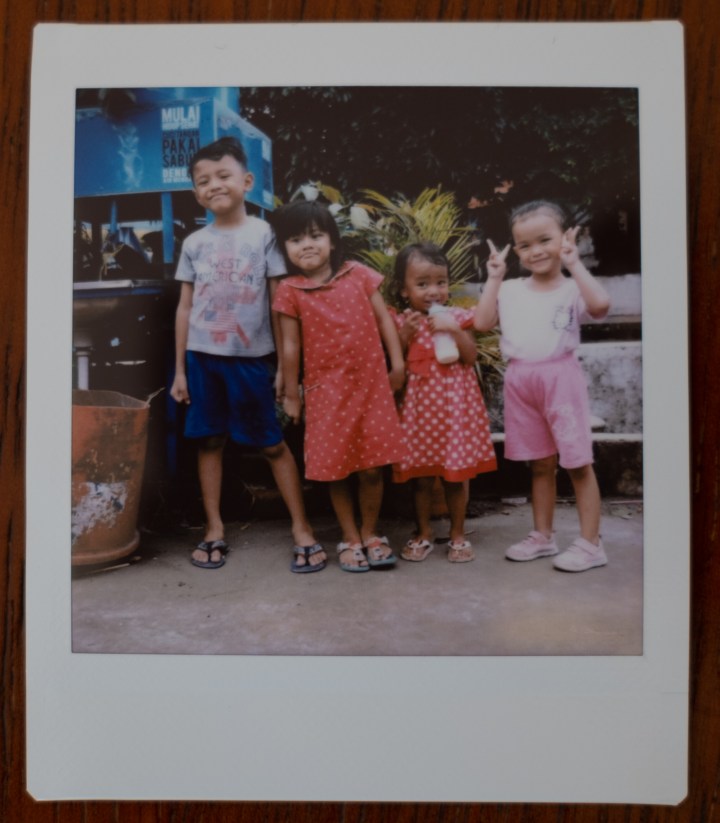
That can be a tremendous advantage when you’re doing street portraits and someone asks for a copy of the photo. This is very common in poorer areas of Indonesia, especially if you take a family photo.
Honestly the smiles you get when you unexpectedly pull a photo print out of your bag are wonderful.
It also flips the dynamic of street photography. Most of the time you’re taking something — an image, a moment. With the printer in your bag, you can leave something behind. The first time someone asked me where I’d send the photo and I just handed them one, the whole interaction changed. They went from “tolerating the photographer” to “let me get my mum, take one of us.”
The printer itself

The earlier versions of these printers had annoying, short life batteries. The current versions charge with USB and its good to go forever. It fits easily in a camera bag pocket together with an extra film cartridge or two, and weighs next to nothing.
Practical things to know:
- A pack of Instax film is 10–20 shots. Carry two.
- Each print takes ~12–15 seconds to come out.
- Prints develop fully in a few minutes — don’t shake them, don’t bend them.
- Keep film out of direct heat. In Jakarta, the glove compartment is not your friend.
Obviously Instax film doesn’t have the same sharpness or vivid colours as a professional print, but it is instant, and so are the smiles.
Recommendation
As a combination for street photography Fuji’s system is incredibly fun and I highly recommend it.
Zack Arias has a good overview of the printer itself below. He talks about the fun of generating engagement in a studio / work setting, but it sounds the same as you’d get using this for street photography or at a party.
Where I’ve used this combo
If you’ve enjoyed this post, here are a few other walks where this setup earned its keep:
- Sunda Kelapa Street Photography walk — first time back to street photography after the pandemic, dock workers and bird-singing competitions in North Jakarta.
- 26 Images of Idul Adha in Sunda Kelapa — religious festival photography where prints helped a lot with consent and trust.
FAQ
Do I need a phone or app to print from the X100V?
No — once paired, the camera sends prints directly via Bluetooth. The phone is only needed for initial setup and firmware updates.
Which Instax printer should I get for street?
The Mini Link 2 is the smallest and cheapest, but the Square Link’s larger square format looks closer to a “classic” Polaroid. Wide Link is the prettiest print but the printer is bulkier.
Can the X100V print to non-Fuji printers?
Not directly. You’d have to send the JPG to your phone first and use the manufacturer’s app.
Is this still a good combo in 2026?
Yes. The X100V was discontinued in favour of the X100VI but the Instax pairing works the same on both, and the V is still excellent.




Leave a Reply